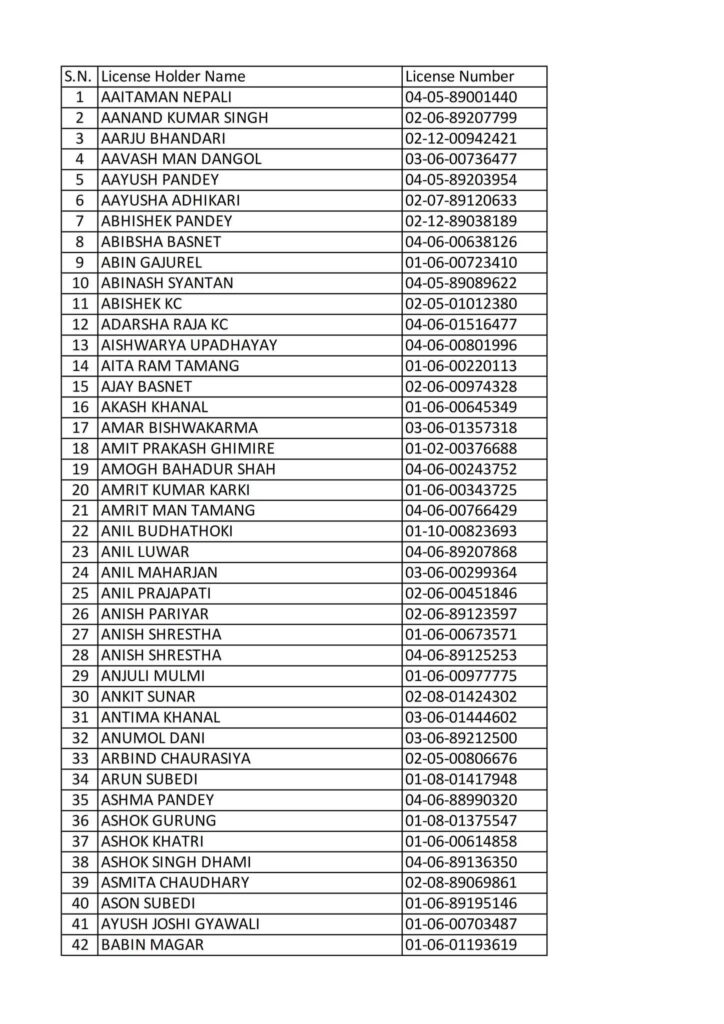
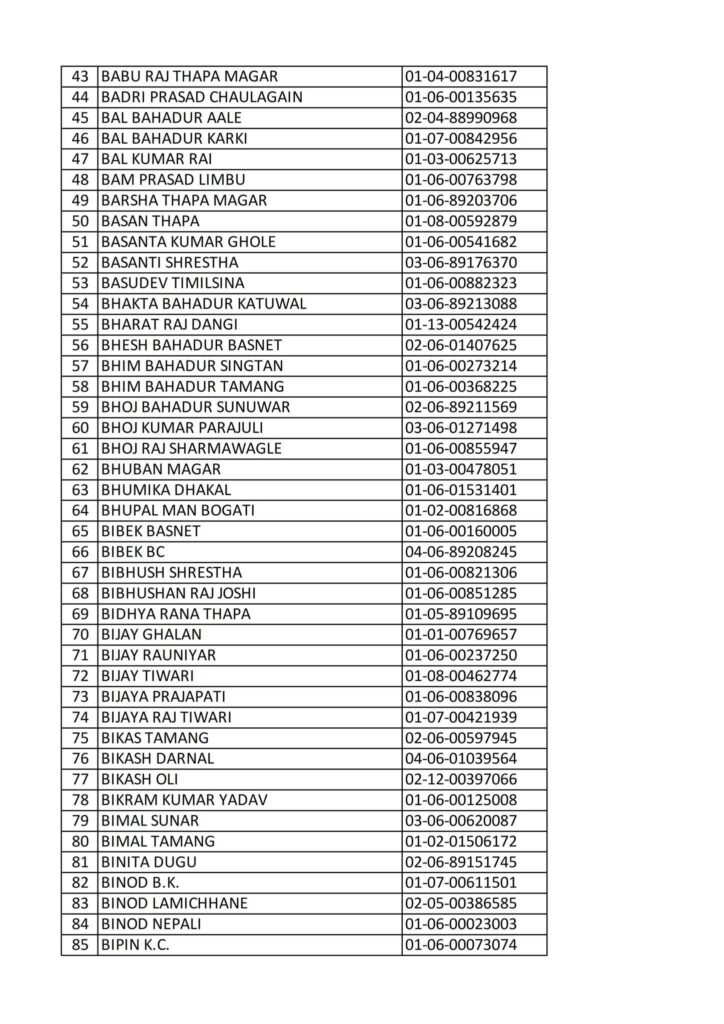
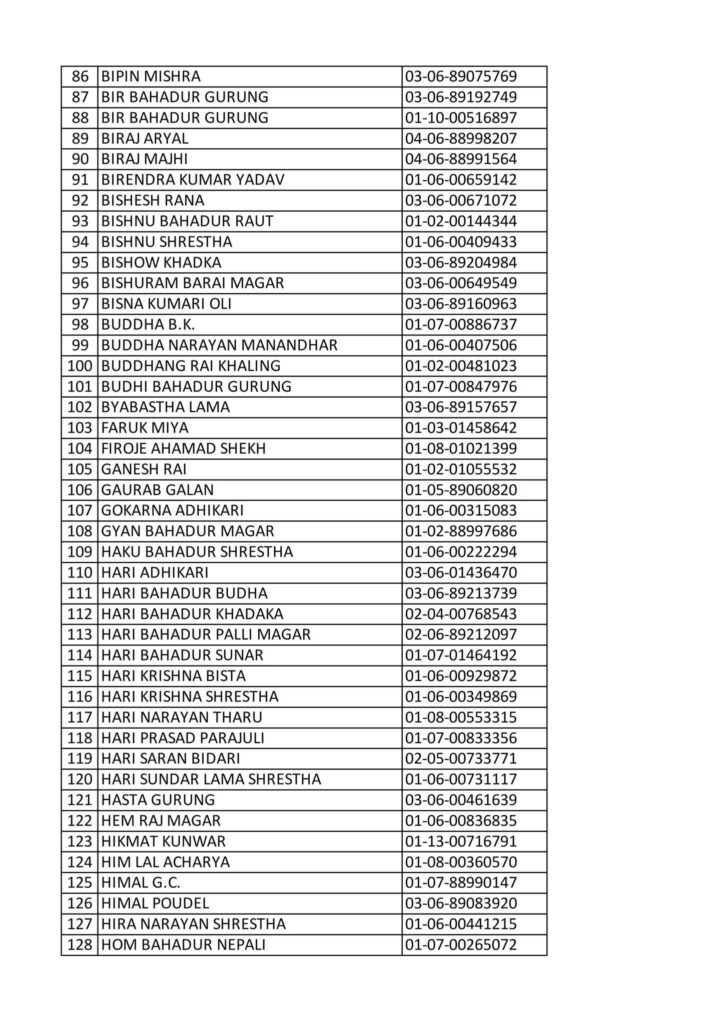
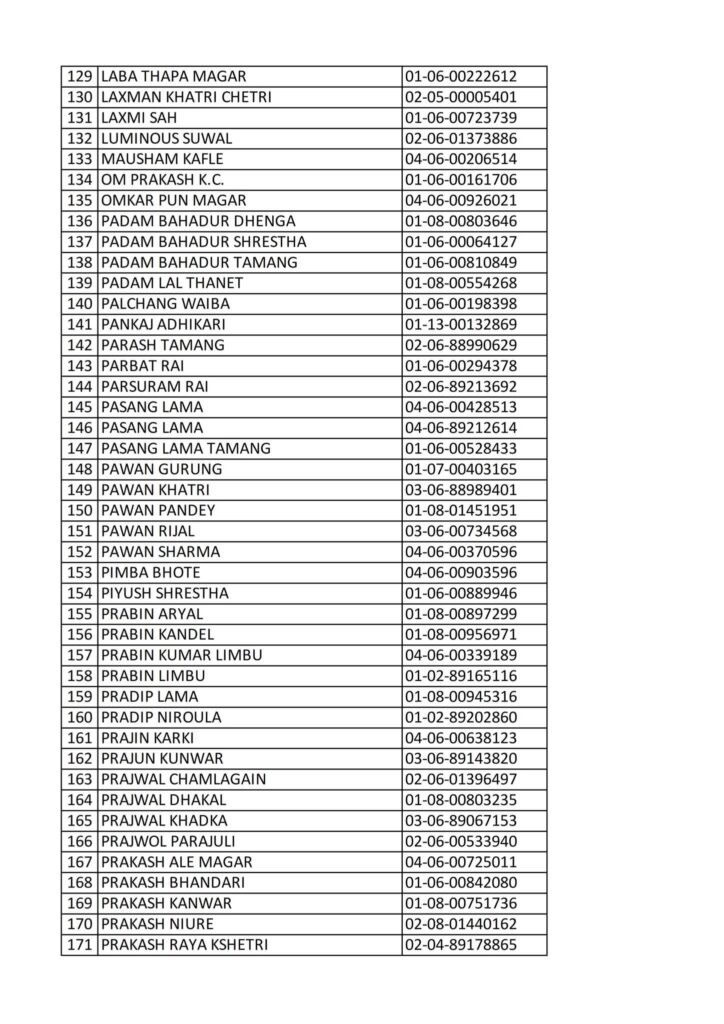
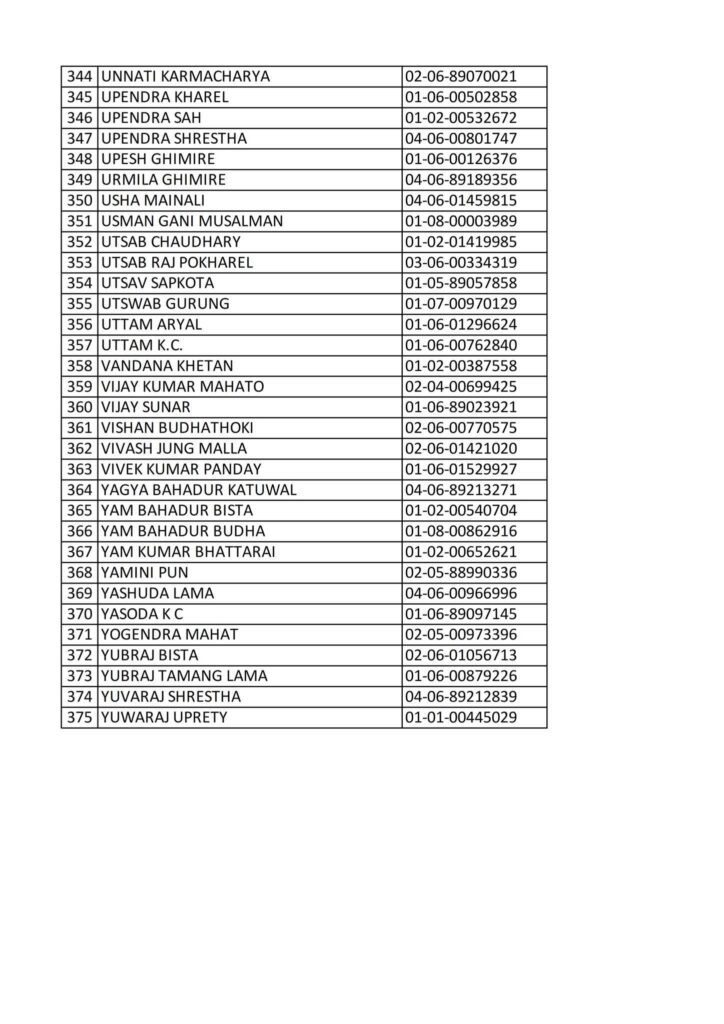
Today 2082-8-17 Printed Nepali Driving License Smart Card Name List
Here’s how to process an “emergency / urgent” smart-card driving license printing in Nepal (i.e. when you need the smart license quickly). The steps are based on the latest publicly available information from Department of Transport Management (DoTM) and relevant authorities.
✅ Who can apply for emergency/urgent smart-card printing
- People travelling abroad for studies or work.
- Non-Resident Nepalese (NRN), migrant workers, or people with valid visa and travel documents.
- Security personnel or people going on official deployments (e.g. for peacekeeping missions), if they need the license urgently.
If you belong to one of the eligible groups, you can request “urgent smart-card printing.” Otherwise, the regular (backlogged) printing queue applies.
📝 What documents / information you need to provide
For an urgent / emergency smart-card request, you typically need:
- Original citizenship (or identity) document + a photocopy.
- Passport (for those travelling abroad) + photocopy.
- Visa + photocopy + plane-ticket (or valid travel booking/ticket) if you are applying because of travel abroad.
- Receipt of license fee payment (or license bill payment receipt).
- A filled application form (for renewal, new license, or category addition) depending on your case.
- If the license holder cannot collect the card in person: a consent/authorization letter (someone else collecting on your behalf).
In short — you need your standard identity/license documents plus proof of urgency (visa, travel ticket, work abroad, etc.), depending on your situation.
🔁 Step-by-Step Process for Emergency Smart-Card Printing
- Go to the official online portal of DoTM (or the online driving-license registration/print system).
- Log in using your mobile number (or as instructed), complete the authentication (e.g. MPIN / OTP, captcha, etc.).
- Fill in or update your license details (existing license or renewal). Select that you need “Urgent / Emergency Smart-Card Printing”.
- Upload required documents: identity, passport/visa (if applicable), travel ticket, payment receipt, any NOC or official letter (if required, e.g. for peacekeepers / NRN).
- Submit application. After submission it goes to DoTM / relevant office (or central printer facility) for verification.
- Wait for approval. Once approved (could take within hours or up to a day depending on workload), you’ll get a confirmation.
- Print or download the “application receipt / print request form” (if system requires), sign it, and visit the designated transport office (or central office — depending on instruction) with your original documents.
- Collect your smart-card once printing is done (in many cases within 2–3 days for emergency requests).
According to recent reports: with the new agreement between DoTM and the Security Printing Centre, emergency licenses are being printed first — up to approx. 500 per day in initial phases.
⚠️ Important Recent Updates — What to Know 🛑
- As of 2024, regular smart-license printing by DoTM has been suspended for general cases; only “essential / emergency” printing is allowed.
- There have been periods when even emergency printing was halted due to technical failures or printer maintenance.
- Because of backlog and printing delays, some urgent requests may still face wait times. Even with emergency status, “urgent” does not guarantee immediate — but reportedly gets faster processing than general queue.
✅ What you should do right now (especially from Pokhara / outside Kathmandu)
Since you are in Pokhara (Province 4), but printing and collection are currently handled through central / major offices (often in Kathmandu area / via the security-printing centre), here’s what you should do:
- Apply online via DoTM’s portal, indicating “urgent / emergency printing” with valid reason (study abroad, job abroad, migration, etc).
- Prepare all required documents (citizenship/passport, visa/ticket if travelling abroad, payment receipt, old license if renewing, etc.).
- Once approved, plan a visit to the designated collection centre (might be Kathmandu or nearest applicable centre).
- If you cannot come in person, provide a consent letter so someone else can collect on your behalf.
If you want — I can check the current status (as of 2025-Dec) of emergency license printing and queue backlog for Gandaki Province (which includes Pokhara / your region) — that helps estimate how soon you might get your card.
Do you want me to fetch those numbers for you now?
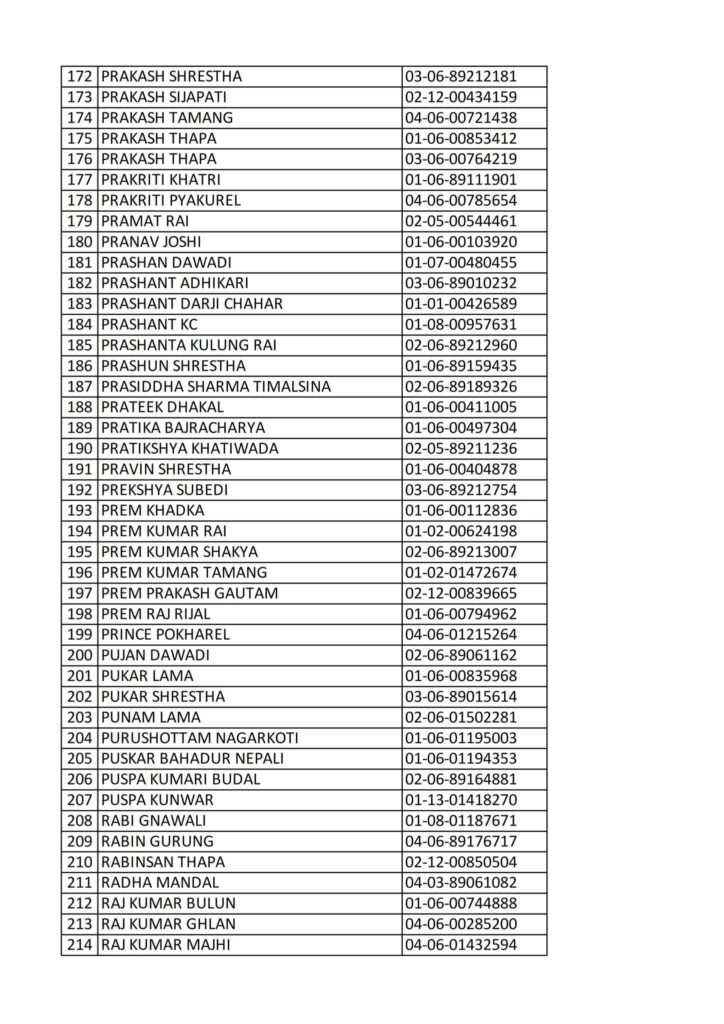
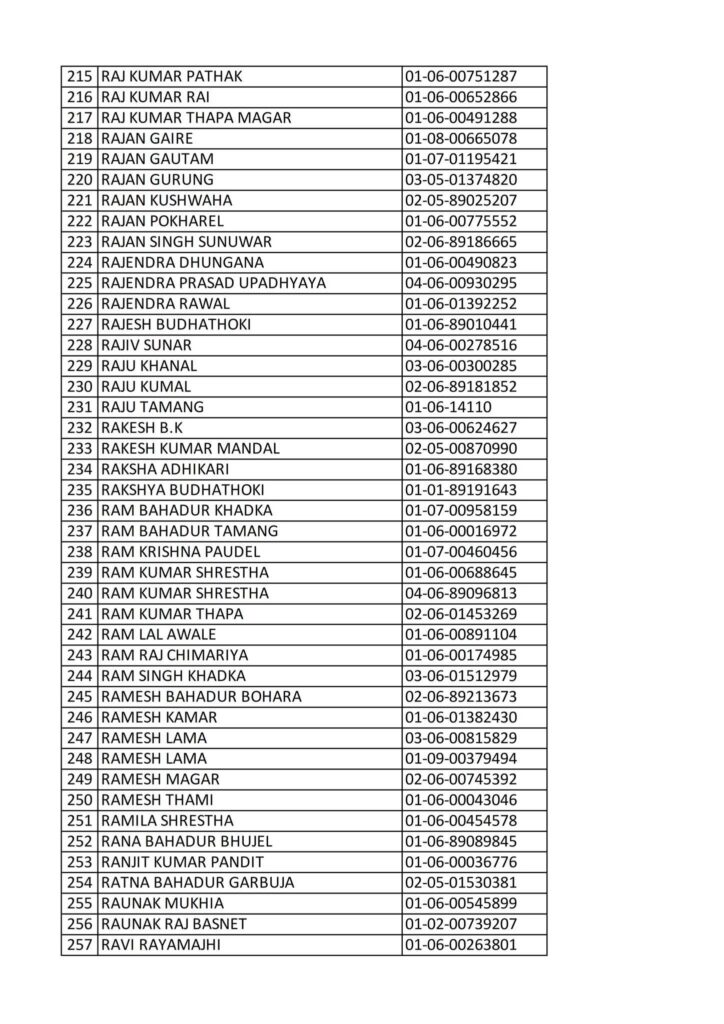
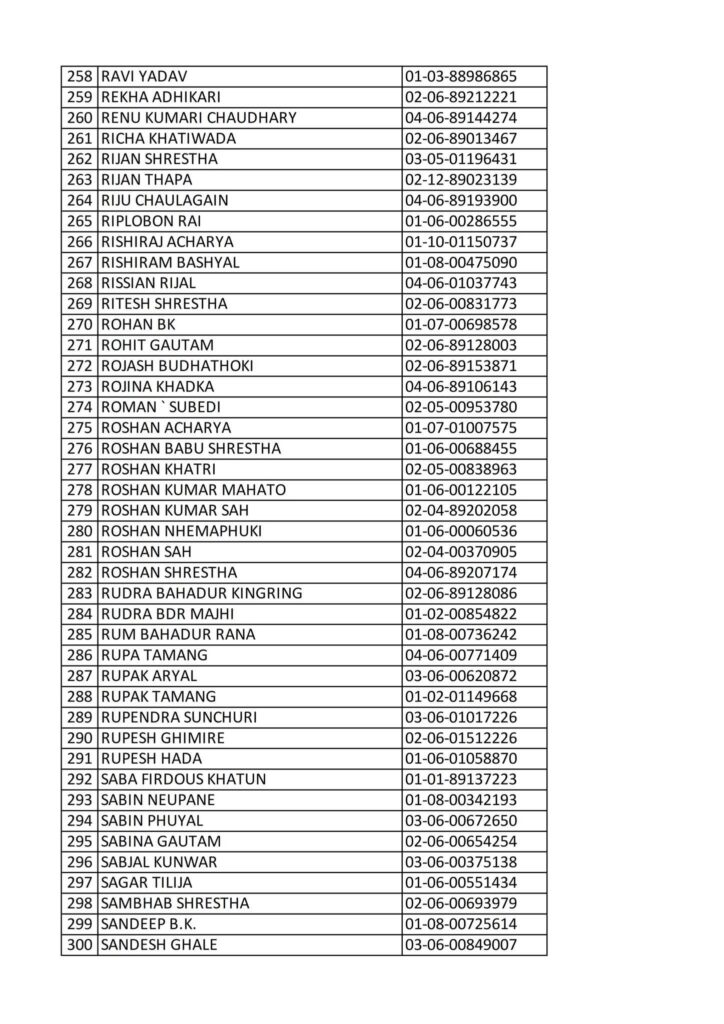
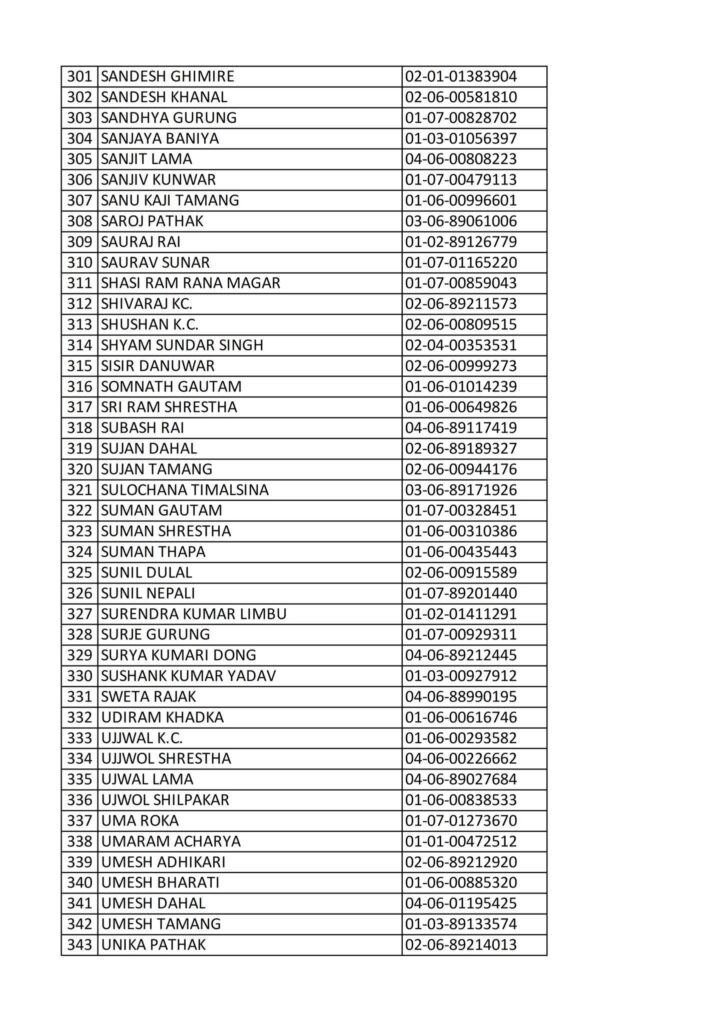
Here’s how to process an “emergency / urgent” smart-card driving license printing in Nepal (i.e. when you need the smart license quickly). The steps are based on the latest publicly available information from Department of Transport Management (DoTM) and relevant authorities.
✅ Who can apply for emergency/urgent smart-card printing
- People travelling abroad for studies or work.
- Non-Resident Nepalese (NRN), migrant workers, or people with valid visa and travel documents.
- Security personnel or people going on official deployments (e.g. for peacekeeping missions), if they need the license urgently.
If you belong to one of the eligible groups, you can request “urgent smart-card printing.” Otherwise, the regular (backlogged) printing queue applies.
📝 What documents / information you need to provide
For an urgent / emergency smart-card request, you typically need:
- Original citizenship (or identity) document + a photocopy.
- Passport (for those travelling abroad) + photocopy.
- Visa + photocopy + plane-ticket (or valid travel booking/ticket) if you are applying because of travel abroad.
- Receipt of license fee payment (or license bill payment receipt).
- A filled application form (for renewal, new license, or category addition) depending on your case.
- If the license holder cannot collect the card in person: a consent/authorization letter (someone else collecting on your behalf).
In short — you need your standard identity/license documents plus proof of urgency (visa, travel ticket, work abroad, etc.), depending on your situation.
🔁 Step-by-Step Process for Emergency Smart-Card Printing
- Go to the official online portal of DoTM (or the online driving-license registration/print system).
- Log in using your mobile number (or as instructed), complete the authentication (e.g. MPIN / OTP, captcha, etc.).
- Fill in or update your license details (existing license or renewal). Select that you need “Urgent / Emergency Smart-Card Printing”.
- Upload required documents: identity, passport/visa (if applicable), travel ticket, payment receipt, any NOC or official letter (if required, e.g. for peacekeepers / NRN).
- Submit application. After submission it goes to DoTM / relevant office (or central printer facility) for verification.
- Wait for approval. Once approved (could take within hours or up to a day depending on workload), you’ll get a confirmation.
- Print or download the “application receipt / print request form” (if system requires), sign it, and visit the designated transport office (or central office — depending on instruction) with your original documents.
- Collect your smart-card once printing is done (in many cases within 2–3 days for emergency requests).
According to recent reports: with the new agreement between DoTM and the Security Printing Centre, emergency licenses are being printed first — up to approx. 500 per day in initial phases.
⚠️ Important Recent Updates — What to Know 🛑
- As of 2024, regular smart-license printing by DoTM has been suspended for general cases; only “essential / emergency” printing is allowed.
- There have been periods when even emergency printing was halted due to technical failures or printer maintenance.
- Because of backlog and printing delays, some urgent requests may still face wait times. Even with emergency status, “urgent” does not guarantee immediate — but reportedly gets faster processing than general queue.
✅ What you should do right now (especially from Pokhara / outside Kathmandu)
Since you are in Pokhara (Province 4), but printing and collection are currently handled through central / major offices (often in Kathmandu area / via the security-printing centre), here’s what you should do:
- Apply online via DoTM’s portal, indicating “urgent / emergency printing” with valid reason (study abroad, job abroad, migration, etc).
- Prepare all required documents (citizenship/passport, visa/ticket if travelling abroad, payment receipt, old license if renewing, etc.).
- Once approved, plan a visit to the designated collection centre (might be Kathmandu or nearest applicable centre).
- If you cannot come in person, provide a consent letter so someone else can collect on your behalf.
If you want — I can check the current status (as of 2025-Dec) of emergency license printing and queue backlog for Gandaki Province (which includes Pokhara / your region) — that helps estimate how soon you might get your card.
Do you want me to fetch those numbers for you now?

What does let Cook means?

Smart Driving License Print Name List

Today 2081-7-28 Printed Nepali Driving Smart Card Namelist
About Author
