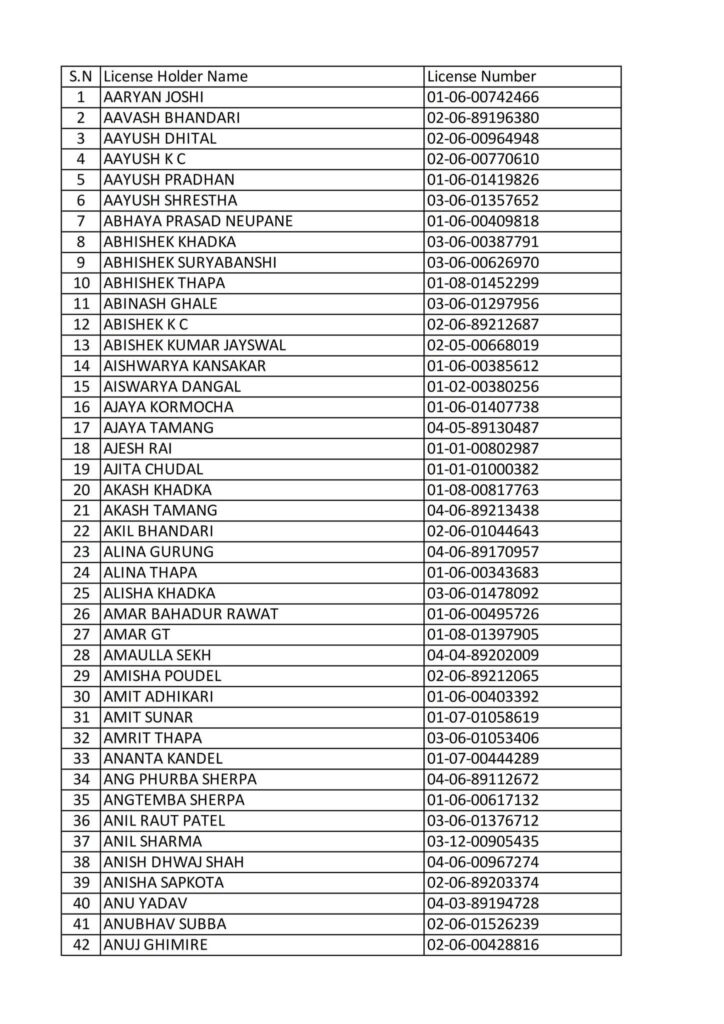
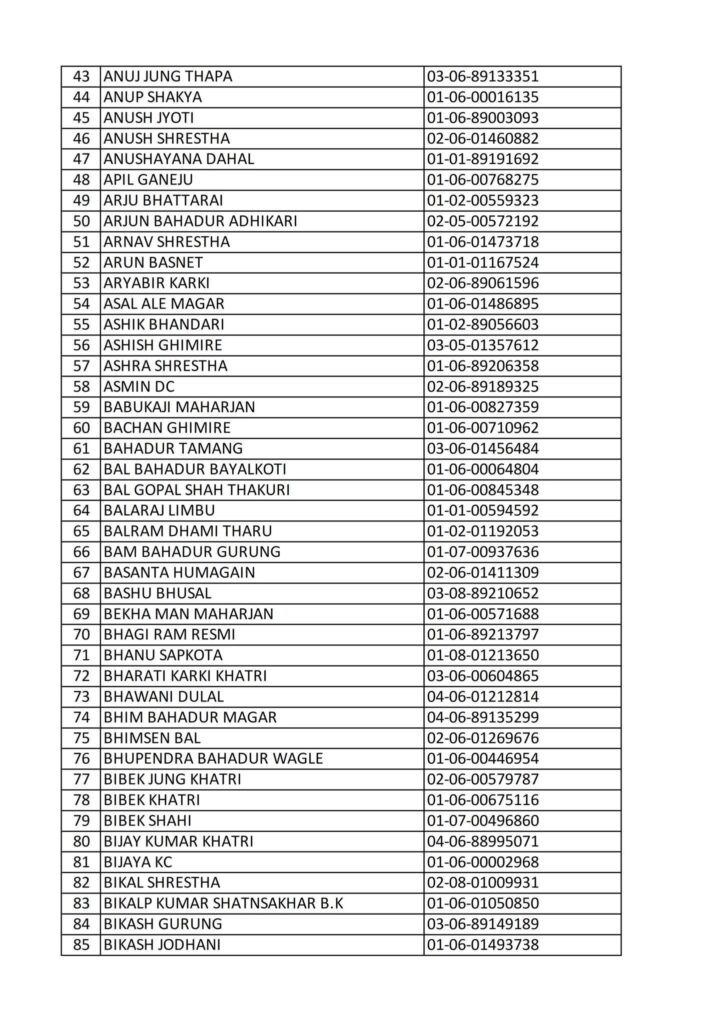
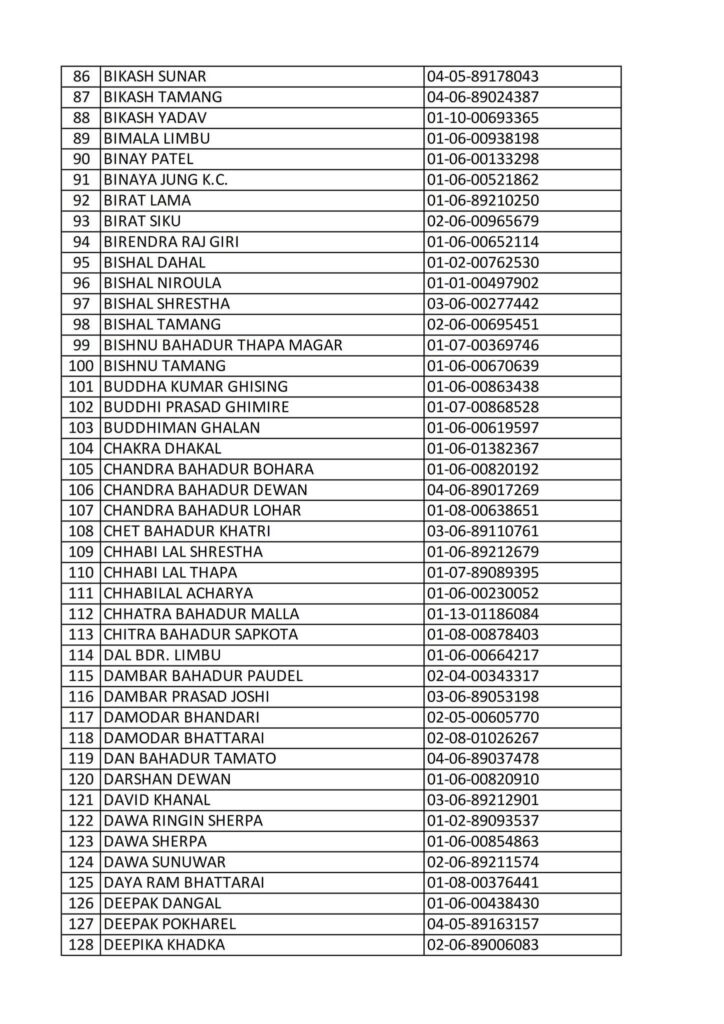
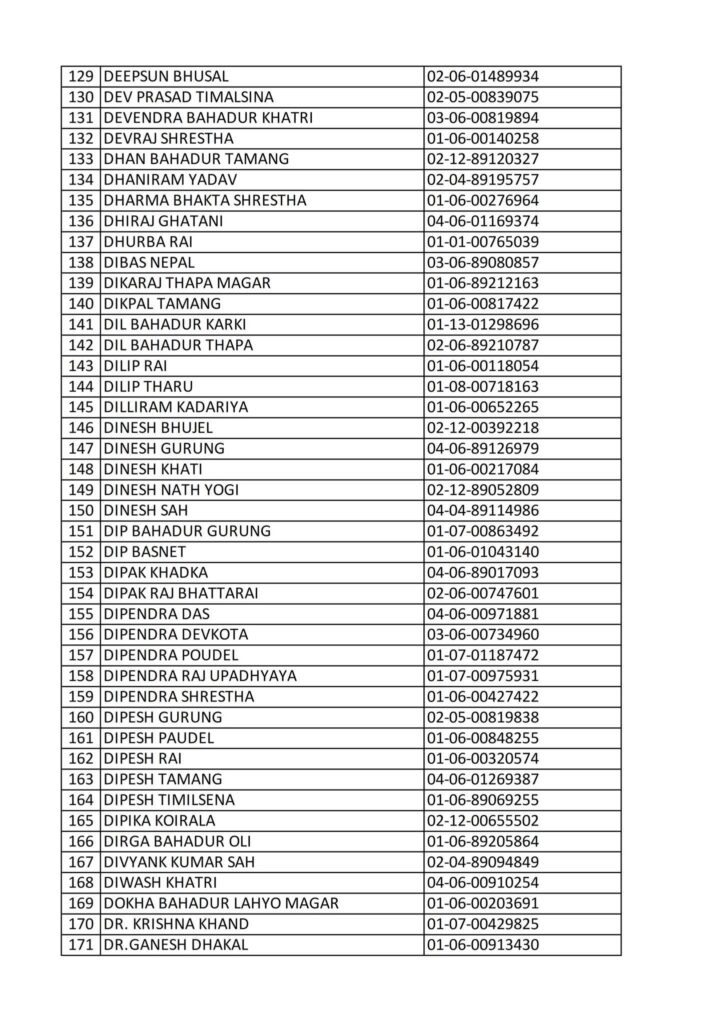
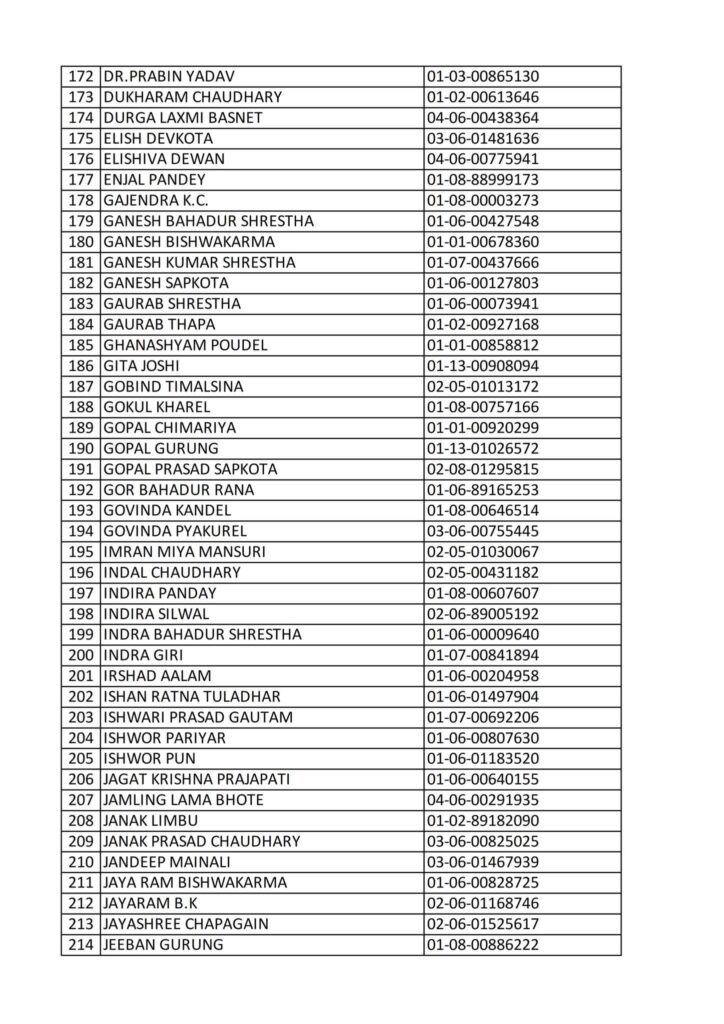
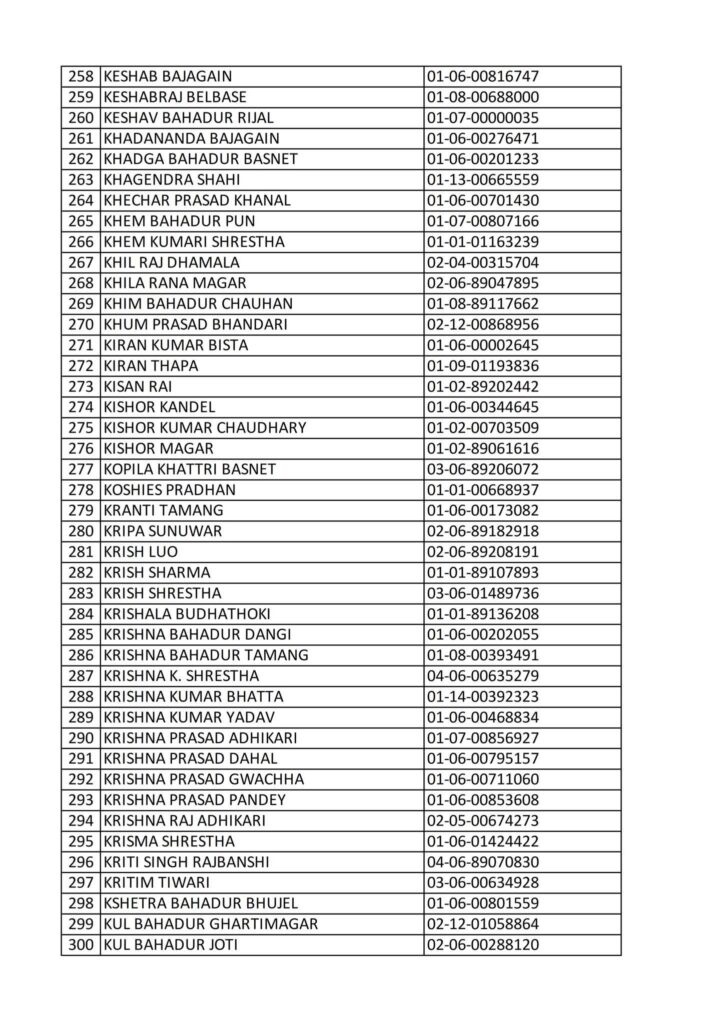
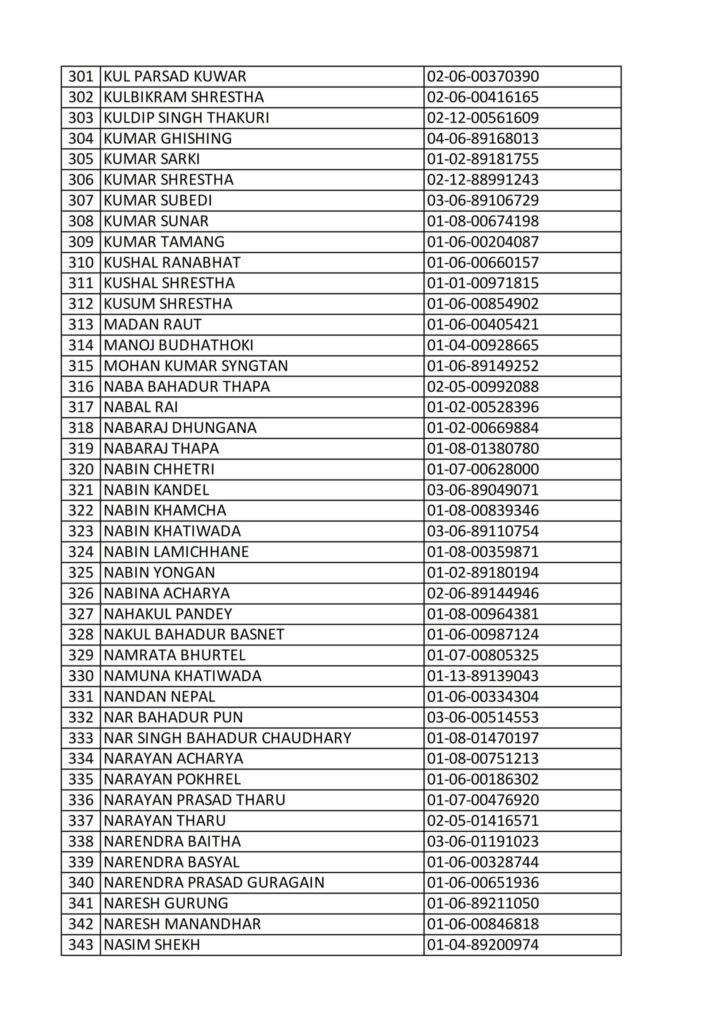
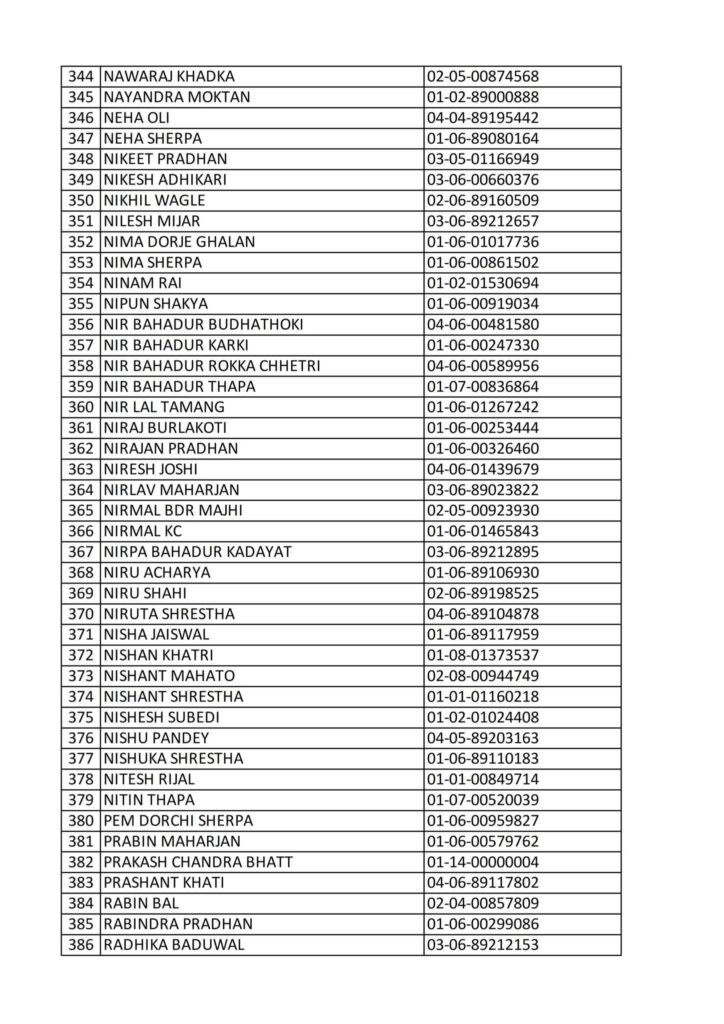
Today 2082-08-16 Printed Smart Card Driving License Name List
Here is a clear and simple explanation of the Nepali Driving License Card Printing Process (in English):
Nepal Driving License Card Printing Process – Step-by-Step
1. Online Application / Registration
- Applicants must first apply online through the DOTM (Department of Transport Management) online system.
- Fill in personal details, choose the licensing category, and select the preferred date for written (theory) test.
2. Biometrics Enrollment
- After online registration, visit the designated Transport Office to complete:
- Photo capture
- Fingerprint scan
- Signature capture
- Document verification
3. Written / Theory Test
- Take the computer-based written exam.
- If you pass, you will receive a date for the practical driving test.
4. Practical Driving Test
- Attend the practical road test (motorcycle, scooter, car, etc.).
- If successful, you become eligible for the driving license.
5. License Approval
- Your test results are forwarded to the central server.
- After verification, the system approves your license for printing.
6. Printing Queue
- Approved licenses enter the central card-printing queue managed by DOTM.
- Printing is done in Kathmandu at the main card-printing facility.
- Depending on workload, printing may take from a few days to several weeks.
7. Card Printing
- The printing machine prints:
- Card holder’s photo
- Personal details
- License number
- QR code / chip
- Vehicle category
- Issue & expiry dates
8. Quality Check & Dispatch
- After printing, the card goes through a quality inspection.
- The card is then packed and dispatched to the respective Transport Office.
9. Collection by Applicant
- Once the license card reaches the office, applicants are notified (SMS or notice board).
- You can visit the office and collect your printed driving license card by showing your exam pass documents or citizenship.
Short Summary (for Facebook / Notice Use)
“Driving license cards in Nepal are printed only after completing biometrics, written and practical exams. After approval, cards enter the DOTM central printing queue, are printed with photo & QR code, go through quality check, and are dispatched to each transport office for collection.”
If you want, I can also write a more formal version, a simplified version, or a version suitable for Facebook post / official notice.

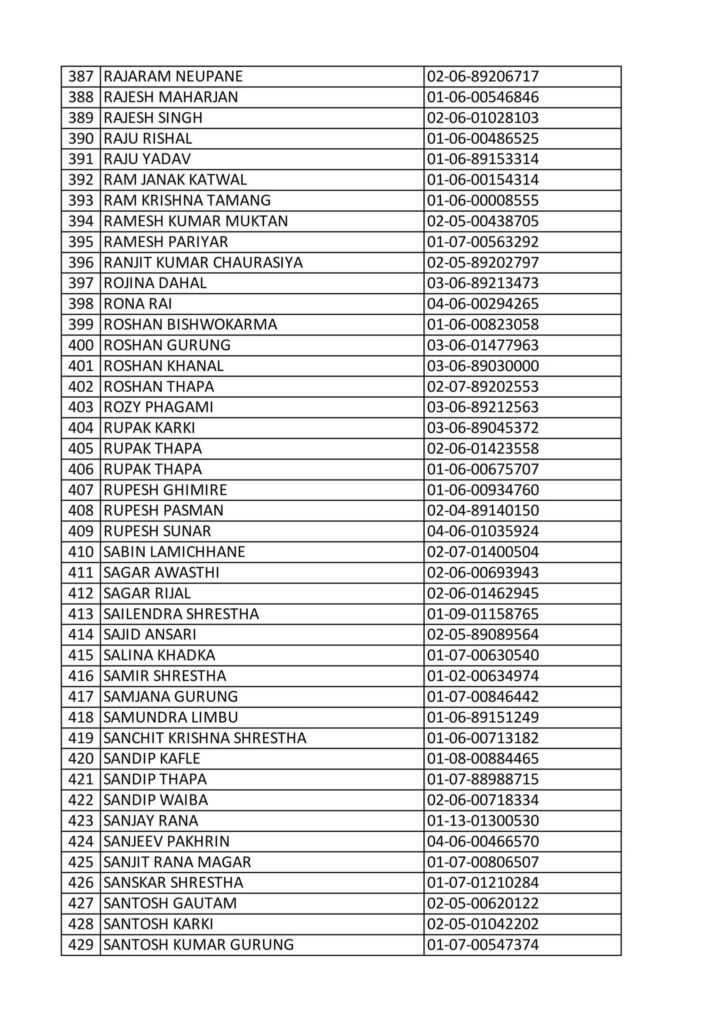
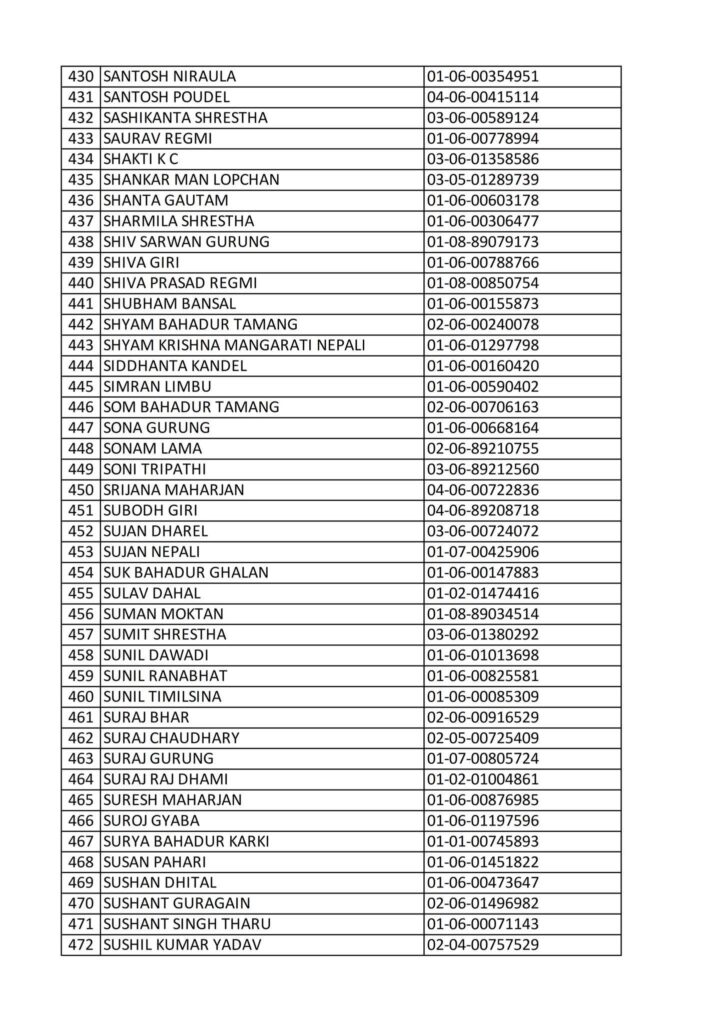

Here is a clear and simple explanation of the Nepali Driving License Card Printing Process (in English):
Nepal Driving License Card Printing Process – Step-by-Step
1. Online Application / Registration
- Applicants must first apply online through the DOTM (Department of Transport Management) online system.
- Fill in personal details, choose the licensing category, and select the preferred date for written (theory) test.
2. Biometrics Enrollment
- After online registration, visit the designated Transport Office to complete:
- Photo capture
- Fingerprint scan
- Signature capture
- Document verification
3. Written / Theory Test
- Take the computer-based written exam.
- If you pass, you will receive a date for the practical driving test.
4. Practical Driving Test
- Attend the practical road test (motorcycle, scooter, car, etc.).
- If successful, you become eligible for the driving license.
5. License Approval
- Your test results are forwarded to the central server.
- After verification, the system approves your license for printing.
6. Printing Queue
- Approved licenses enter the central card-printing queue managed by DOTM.
- Printing is done in Kathmandu at the main card-printing facility.
- Depending on workload, printing may take from a few days to several weeks.
7. Card Printing
- The printing machine prints:
- Card holder’s photo
- Personal details
- License number
- QR code / chip
- Vehicle category
- Issue & expiry dates
8. Quality Check & Dispatch
- After printing, the card goes through a quality inspection.
- The card is then packed and dispatched to the respective Transport Office.
9. Collection by Applicant
- Once the license card reaches the office, applicants are notified (SMS or notice board).
- You can visit the office and collect your printed driving license card by showing your exam pass documents or citizenship.
Short Summary (for Facebook / Notice Use)
“Driving license cards in Nepal are printed only after completing biometrics, written and practical exams. After approval, cards enter the DOTM central printing queue, are printed with photo & QR code, go through quality check, and are dispatched to each transport office for collection.”
If you want, I can also write a more formal version, a simplified version, or a version suitable for Facebook post / official notice.

How to make money online?
Today Printed Nepali Driving License Smart Card Name List | License Status Check Nepal

How to make human healthy?
About Author
